


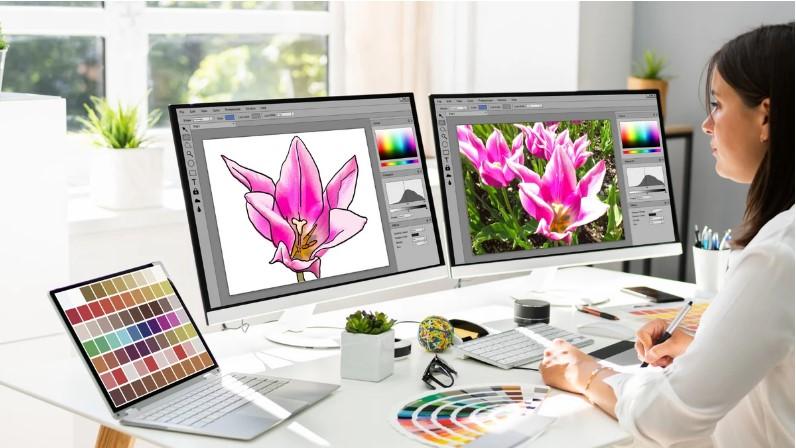
Good artwork can make a brand look sharp and clear. But not all image files are made for print or large use. A small JPG or PNG can look fine on a screen and still look rough when it is made bigger. This is why many brands use vector art for logos, signs, shirts, and print work.
Vector Artwork Conversion turns a pixel image into clean vector art. The art is made with lines, shapes, and curves instead of small pixels. This lets the design grow or shrink without losing its sharp look. It is a useful step for logos, print work, signs, labels, and many other brand needs.
What Is Vector Artwork?
Vector artwork is digital art made with paths, shapes, lines, and curves. Unlike a raster image, it does not depend on a fixed set of pixels.
Common vector file types include:
-
AI
-
EPS
-
SVG
-
PDF
These files can be opened and edited in many design tools. The exact use depends on the file type and the software being used.
Vector art is often used when a design must stay clear at many sizes.
Why Logos Need Vector Art
A logo may be used in many places. It may appear on a business card one day and a large sign the next.
A raster image may become blurry when it is enlarged. A vector logo can be scaled while keeping clean edges.
This makes vector art useful for:
-
Business logos
-
Product labels
-
Store signs
-
Clothing
-
Packaging
-
Brochures
-
Banners
-
Vehicle graphics
A good vector logo also gives a designer more control over colors, shapes, and text.
How Vector Conversion Works
1. Review the Source Image
The first step is to check the source image.
The designer looks at the shape, color, text, and small details. A clear source file makes the job easier. But even a low-quality image can often be rebuilt with careful work.
The designer also checks how the final art will be used.
2. Trace the Main Shapes
The next step is to recreate the main parts of the design.
Lines and curves are drawn with vector paths. The goal is to match the source while keeping the new art clean.
Good tracing is not just about following the edge. The designer must decide where points should be placed. Too many points can make a path rough. Too few can change the shape.
3. Clean the Curves
Smooth curves are important in logos and brand art.
A skilled designer checks each curve and line. Small bumps can become easy to see when the art is used on a large sign or print.
Clean paths help the final design look more professional.
4. Rebuild the Colors
Color is also important.
The designer checks the source and selects matching colors. For print work, the color setup may need to follow the needs of the print shop.
A brand should also keep its main colors consistent across its work. This helps people recognize the brand.
5. Recreate Text
Text needs care during vector conversion.
The designer may need to identify the font or rebuild the letter shapes. Small changes in letter size, spacing, or shape can change the look of a logo.
The goal is to keep the text clean and close to the original.
Vector Art for Printing
Print work needs sharp artwork.
A vector file can be used at many sizes without the same pixel blur that can happen with a low-resolution raster image.
This is useful for:
-
Flyers
-
Posters
-
Business cards
-
Signs
-
Labels
-
Stickers
-
Packaging
-
Product cards
Before printing, the file should still be checked for the printer's needs. Color mode, bleed, size, and file format can vary by project.
Vector Art for Branding
Branding needs consistency.
A company may use the same logo on its website, shirts, signs, boxes, and ads. A clean vector master file makes it easier to prepare the logo for these uses.
It can also make future design work faster.
For example, a designer may need a small logo for a card and a large version for a wall sign. The same vector source can be scaled for both uses.
Vector Art for Apparel
Vector artwork is also useful for clothing.
It can be used for screen printing, heat transfer, DTF print work, and other production methods. The exact file setup depends on the process.
A clean vector file helps the production team work with clear shapes and colors.
Simple artwork can often be prepared quickly. Complex art may need more time because each part must be rebuilt with care.
Why Manual Conversion Can Help
Automatic tracing tools can save time. But they do not always create clean paths.
They may add too many points. They can also create rough curves, poor shapes, or unwanted objects.
Manual work gives the designer more control.
A skilled artist can:
-
Remove unwanted points
-
Smooth curves
-
Fix shapes
-
Clean small details
-
Match colors
-
Fix spacing
-
Simplify complex areas
This can make the final file easier to edit and use.
Choosing the Right File Format
Different jobs may need different vector formats.
AI Files
AI files are commonly used in Adobe Illustrator. They are useful for editing and design work.
EPS Files
EPS is widely used for print and design work. It can be useful when artwork needs to move between different systems.
SVG Files
SVG files work well for many web and digital uses. They can also be used with some cutting and design tools.
PDF Files
A PDF can hold vector artwork and is widely used for sharing and print work. But the exact content of a PDF can vary, so it should be checked before production.
Vector Art for Embroidery
Vector art can also be a useful starting point for embroidery digitizing.
But a vector file is not an embroidery file. It does not tell an embroidery machine where to place stitches.
The vector art must first be turned into embroidery stitch data. A digitizer chooses stitch types, density, underlay, stitch direction, and stitch order.
A clean vector source can make this process easier because the shapes are clear.
How to Check a Vector File
Before using the final artwork, check a few key points.
Look at the Curves
Zoom in and inspect curved edges. They should look smooth.
Check the Shapes
Make sure no unwanted shapes or open paths are left behind.
Check the Colors
Confirm that the colors match the brand or print plan.
Check the Text
Make sure the text is correct and the spacing looks right.
Test the File
If the art is for production, test it before a large order. A small test can help find issues before they cost time and money.
Common Vector Conversion Mistakes
Poor Auto-Trace Results
Automatic tracing can create messy paths. These paths may look fine at first but cause trouble later.
Too Many Anchor Points
Too many points can make curves rough and hard to edit.
Wrong Colors
A close color is not always the right color for a brand.
Lost Details
Some small details may disappear during conversion. The designer should know which details matter most.
No Final Check
A file should always be reviewed before delivery.
How to Choose a Vector Conversion Service
Look for a service with real examples of vector work.
Check if its samples include logos, detailed art, and clean line work. Ask what file types are included and whether edits are part of the service.
It is also useful to ask how the artwork is created. Manual tracing can give better control than a basic auto-trace process.
Clear communication is another good sign. Share the source file, final use, size, colors, and file type before the work starts.
Why Experience Matters
Vector conversion may look simple, but good results need design skill.
A trained artist knows how to build clean paths. They also know when to simplify a shape and when to keep a small detail.
Real production work teaches another key lesson. Artwork must not only look good on screen. It must also work well in the real world.
A logo for a large sign may need different checks from a logo for a small label.
Final Thoughts
Vector artwork is a strong choice for logos, printing, and branding. It gives businesses a clean source file that can be used at many sizes.
Good conversion is more than tracing an image. It involves careful paths, smooth curves, accurate colors, clean text, and a final quality check.
If you need vector art for print, apparel, signs, or branding, choose a service that understands both design and production needs. Check real samples and ask about the file formats you need.
Absolute Digitizer can be considered when looking for professional artwork conversion and clean vector files. A well-made vector master can save time, improve print results, and make future design work much easier.
With a clean vector file in hand, your logo and brand art can stay sharp and ready for many uses, from a small business card to a large sign.




 English